 NexaCRM
Machinery & Engineering CRM
CRM for machinery & engineering companies
Selling machines means long sales cycles, technical discussions, demos and service after installation. NexaCRM keeps every specification, quotation revision and follow-up in one place.
The challenge
Why machinery & engineering businesses lose sales
Long, forgotten sales cycles
A buyer who asked six months ago is ready now — but nobody remembers to call.
Specifications in e-mail threads
Capacity, power and application details are scattered across mails and WhatsApp.
Quotation revisions
Options, accessories and price revisions are hard to track per customer.
After-sales gaps
Installation, warranty and AMC renewals slip, and repeat business is lost.
The solution
How NexaCRM helps machinery & engineering teams
Technical requirement fields
Machine type, capacity, application and power supply on every lead.
Quotations with options
Base machine plus accessories, spares and optional items with GST.
Demo & visit planning
Schedule factory demos and site visits with reminders and calendar sync.
Installation tracking
Record installation dates, warranty and AMC status on the customer.
Service follow-ups
Automatic tasks for AMC renewal, spares and periodic service calls.
Pipeline by machine
See open value by machine type, region and salesperson.
Workflow
Your sales process, step by step
Enquiry with application and capacity
Technical discussion and demo
Quotation with options and revisions
Order, installation and AMC follow-up
Industry module
Switch on the Machinery & Engineering module in one click
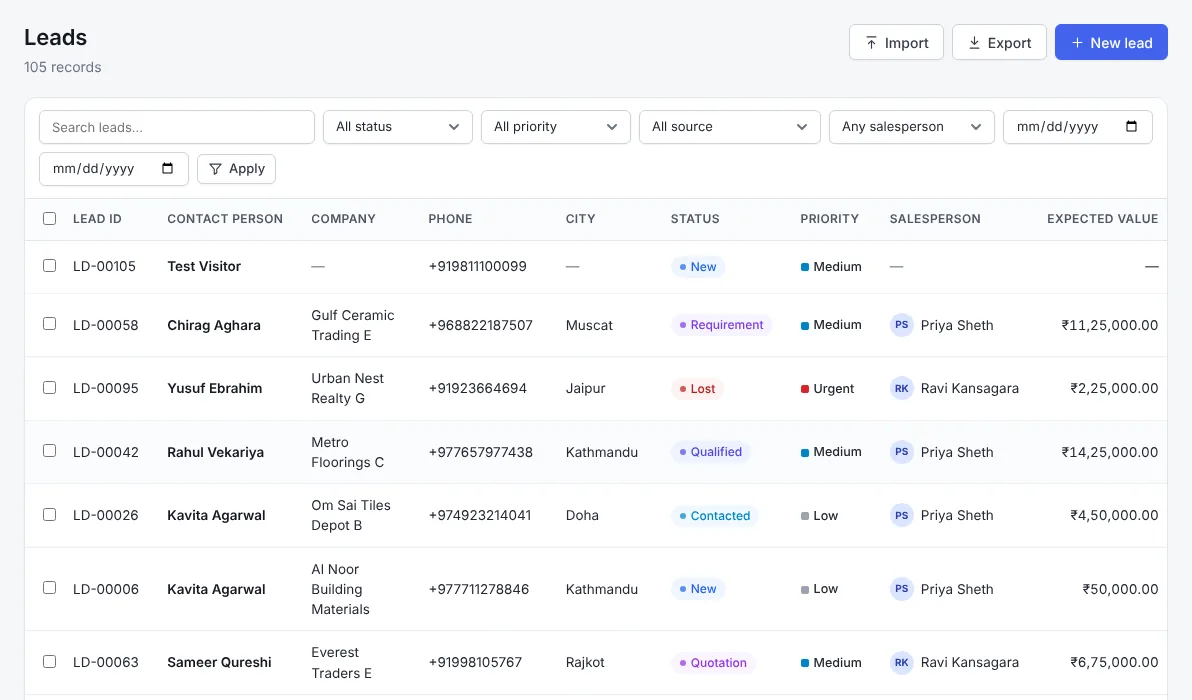
Go to Settings → Industry modules and enable it. These fields appear on your forms straight away — your existing data is not changed.
Lead fields
Customer fields
Deal fields
Lead sources
Included in every plan
Everything else your team needs
FAQ
Machinery & Engineering CRM — frequently asked questions
Can I record technical specifications on a lead?
Yes. The machinery module adds machine type, capacity, application and power supply fields to leads.
Can quotations include optional accessories?
Yes. Add the base machine and any accessories or spares as separate lines with their own price and tax.
Does it remind us about AMC renewals?
Yes. Store AMC and warranty dates on the customer and let workflows create follow-up tasks.
Is it suitable for dealers of imported machines?
Yes. Manufacturers, importers and dealers all use the same leads, quotations and service flow.
Related industries
Also built for
Exporters CRM
Export CRM for Indian manufacturers and merchant exporters: manage international buyers, multi-currency quotations, Incoterms, ports, shipments and follow-ups across time zones.
Automotive CRM
Automotive CRM for vehicle dealers, service workshops and auto-parts manufacturers: track enquiries, test drives, exchange vehicles, service reminders and B2B parts orders.
Wholesale & Distribution CRM
Distribution CRM for wholesalers, distributors and stockists: manage retailers and dealers, territories, credit limits, repeat orders, schemes and outstanding payments.
Ready to grow your machinery & engineering sales?
Start a free trial, switch on the Machinery & Engineering module and capture your first enquiry today.