 NexaCRM
Real Estate CRM
Real estate CRM for builders & brokers
Capture every enquiry from property portals, Facebook ads and walk-ins, schedule site visits and turn them into bookings — while tracking channel partners and payments.
The challenge
Why real estate businesses lose sales
Portal leads go cold
Enquiries from 99acres, MagicBricks and ads are not called within minutes.
Site visits not tracked
Who visited, what they liked and the next step is lost.
Broker disputes
It is unclear which channel partner brought which buyer.
No booking pipeline
Owners cannot see hot buyers and expected bookings per project.
The solution
How NexaCRM helps real estate teams
Buyer requirements
Budget, configuration (1/2/3 BHK), preferred location and purpose.
Site-visit scheduling
Book visits, send reminders and record feedback.
Channel partners
Tag the broker on each lead to settle brokerage fairly.
Instant assignment
Round-robin assignment so every portal lead gets a call fast.
Booking pipeline
Enquiry → visit → negotiation → booking per project.
WhatsApp follow-ups
Share brochures and price sheets on WhatsApp from the lead.
Workflow
Your sales process, step by step
Enquiry from portal, ad or walk-in
Requirement and budget captured
Site visit and feedback
Negotiation, booking and payment schedule
Industry module
Switch on the Real Estate module in one click
Go to Settings → Industry modules and enable it. These fields appear on your forms straight away — your existing data is not changed.
Lead fields
Customer fields
Deal fields
Lead sources
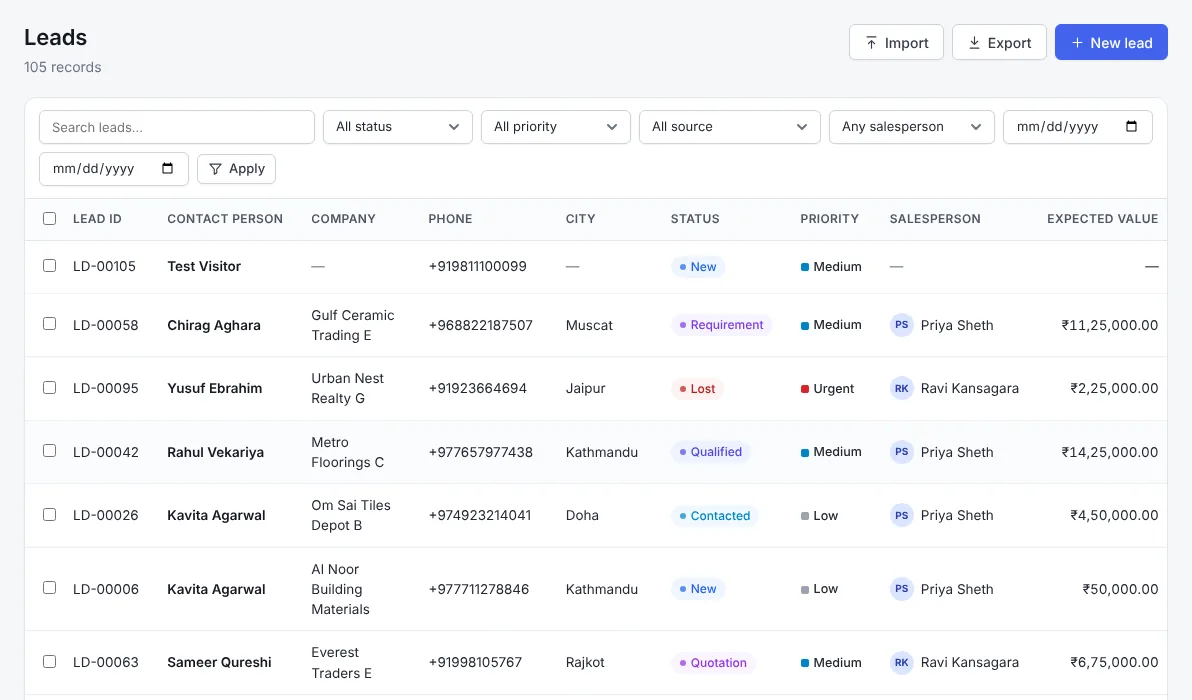
Included in every plan
Everything else your team needs
FAQ
Real Estate CRM — frequently asked questions
Can I capture leads from property portals?
Yes. Portal e-mails, website forms and Facebook lead ads can create leads automatically.
Can I schedule site visits?
Yes. Add the visit date to the lead or deal and get reminders and calendar sync.
Can I track channel partners?
Yes. Record the channel partner on each lead and report bookings per partner.
Does it work for brokers too?
Yes. Brokers and developers both use requirements, visits and the booking pipeline.
Related industries
Also built for
Construction CRM
Construction CRM for contractors, infrastructure firms and building-material suppliers: track projects, tenders, site details, BOQ quotations and project stages.
Hospitality & Travel CRM
Hospitality CRM for hotels, resorts, banquet halls and travel agencies: capture booking enquiries, events, group stays and corporate accounts and follow up on time.
Professional Services CRM
CRM for consultants, CA firms, IT and digital agencies: manage enquiries, proposals, retainers, renewals and client follow-ups in one simple system.
Ready to grow your real estate sales?
Start a free trial, switch on the Real Estate module and capture your first enquiry today.